The owner's practical buying guide
Payroll, Scheduling
& HR for Pawn Shops
A clear-eyed comparison of Deel, Rippling, BambooHR, Paycom and ADP Workforce Now.
Choose software around your shop.
Understand the full bill. Test the daily work. Know how to leave.
A star rating cannot tell you who will fix a missed paycheck, whether shift scheduling costs extra, or whether your five-person team is paying a minimum fee designed for a much larger business. This guide turns those questions into a practical buying process.
Who this is for: US pawn-shop owners and managers, especially owner-led stores and growing groups. These HR products complement your pawn system; this guide does not establish that any of them replaces it or integrates with it.
Prepared by PawnShopSoftware.com, operated by BuzzTransit LLC. This edition is based on public research, not hands-on product testing or negotiated vendor quotes. Product-fit judgments are PSS editorial assessments. No affiliate tracking links are included.
01 / Find your starting point
Match the problem
before the platform
These are research-based starting points, not awarded rankings or purchase recommendations for every shop.
| YOUR MAIN PROBLEM | START YOUR EVALUATION HERE | WHAT MUST BE PROVEN |
|---|---|---|
| A small US team mainly needs payroll | Include ADP RUN in the comparison, even though the original shortlist names Workforce Now. | A complete price for your headcount, pay frequency and timekeeping needs. |
| Schedules, hours and staff changes are disconnected | Rippling; also test Paycom and BambooHR Time & Attendance. | A real shift change flowing into the correct timecard and payroll. |
| Hiring paperwork and employee records are scattered | BambooHR; compare the required add-ons. | Enough measurable administrative benefit to justify the small-team flat fee. |
| You want employees to catch pay issues earlier | Paycom and its Beti workflow. | The fallback when an employee does not review their paycheck. |
| You hire overseas contractors or staff | Deel, using the correct contractor, payroll or employment service. | Which service is appropriate and the complete cost of that service. |
| A larger group needs broader HR administration | ADP Workforce Now alongside other full-suite contenders. | Store-level permissions, reporting and benefits/time modules. |
The pawn-system check: Ask your current provider what it can export. Ask each HR vendor to demonstrate how that file or connection is used. A general accounting integration does not establish that sales commissions, hours or employee changes will sync with your pawn software.
Source notes: Product positioning and capabilities: [2]-[14]. Exact pawn-software compatibility remains unverified.
02 / Know the full bill
Compare the complete cost
All figures below are USD. Published amounts are not customized offers. Software fees exclude wages, employer taxes and insurance premiums.
| PLATFORM | VERIFIABLE PRICE SIGNAL | WHAT IS STILL MISSING |
|---|---|---|
| Deel | Contractors $49; Contractor of Record $325; US PEO $125; EOR $599 per worker/month. | Standalone US-payroll quote and complete service scope. These are different products. |
| Rippling | Plans start at $8/employee/month, plus a monthly base fee. | Base fee amount, required platform, payroll, scheduling, timekeeping and setup. |
| BambooHR | Up to 25 staff: Core $250, Pro $425, Elite $650 monthly. | Payroll, Time & Attendance and benefits-administration add-ons. |
| Paycom | Custom quote; pricing page describes a one-time implementation fee. | Dollar amounts, chosen functions, billing basis and contract terms. |
| ADP Workforce Now | Custom quote; Select, Plus and Premium packages. | Package, implementation, additional services and any usage-based fees. |
BambooHR Core: the effect of a minimum fee
| TEAM SIZE | BASE HR / MONTH | EFFECTIVE COST / PERSON |
|---|---|---|
| 5 employees | $250 | $50.00 |
| 15 employees | $250 | $16.67 |
| 25 employees | $250 | $10.00 |
The annualized Core subscription is $3,000 at each of these headcounts, before extras or discounts. Calculations use the published small-team fee; this is not the cost of a complete payroll package. [6]
Compare two years: Include recurring fees, setup, migration, equipment and transaction charges. Remove introductory discounts and apply agreed renewal increases when calculating year two.
Source notes: Pricing: [1], [3], [6], [9], [12]. Actual agreements govern. For changing headcount, calculate month by month.
03 / Platform profile
Deel
The strongest reason to investigate: domestic payroll alongside international hiring or contractor needs.
What it offers
Deel separates contractor management, Contractor of Record, Employer of Record, US PEO and payroll services. EOR supports hiring without opening your own local entity; its US PEO is a co-employment service. Compare the appropriate arrangement, not the cheapest number on the page. [1]
Its US-payroll page distinguishes self-service from managed payroll. Deel positions managed payroll for teams without US-payroll expertise and more involved situations such as hourly workers. It also advertises off-cycle US payroll without an additional payment-run charge and 24/7 support. [2]
What that means for a pawn shop
If you use overseas support staff, ask whether Deel would simplify their administration alongside your domestic team. For a store with only local employees, the relevant comparison is the US-payroll product and its actual service level. International coverage by itself does not establish better value for your store.
Questions that can change the decision
1. Which exact service covers each worker, and which fees are employer service charges versus employment costs?
2. Can you demonstrate our pay frequency, missed punches, commissions and corrections?
3. Who owns each step in managed payroll, and what input deadlines remain ours?
4. Does 24/7 support include a person who can resolve our payroll issue, through which channel?
5. What notice, data-export and termination terms apply to our order?
A specific contract detail to read
The public pricing page describes monthly flexibility, but a particular PEO promotion requires a minimum two-year term and repayment obligations on early termination. Do not apply either statement to every Deel service: check the actual order form and promotion. [1]
Source notes: [1] Deel pricing and promotional terms. [2] Deel US payroll. Fit assessment and demo questions are PSS analysis.
04 / Platform profile
Rippling
The strongest reason to investigate: bringing schedules, hours, payroll and employee changes into a connected workflow.
What it offers
Rippling uses modular pricing. Its pricing page lists a starting rate of $8 per employee monthly plus a base fee; total cost depends on the products purchased. A payroll-specific configuration requires a quote. [3]
Scheduling capabilities include staff availability, eligible shift swaps, attendance alerts and visibility into staffing needs. The product page also describes rules using employee attributes such as certifications. [4]
What that means for a pawn shop
The important benefit to test is the sequence from publishing a schedule to approving a timecard and paying the employee. Ask a manager to perform the process rather than watch a prepared sales presentation. A feature-rich system is useful only when the relevant work becomes easier for your people.
Questions that can change the decision
1. List every required product and its separate price: platform, payroll, timekeeping, scheduling and any employee messaging.
2. If someone works in two stores, show the timecard and store-level labor report.
3. Which changes flow automatically, and which require an import or approval?
4. What happens to charges when headcount falls or staff are inactive?
5. Specify the renewal date, cancellation notice, implementation cost and post-cancellation access in the quote.
Support: measure the right thing
Rippling publishes support metrics including first live-chat response time. That is useful evidence about responsiveness, but it is not the same measure as correcting a payroll problem. Ask how urgent cases are escalated and how the selected plan handles evenings and weekends. [5]
Source notes: [3] Rippling pricing. [4] Scheduling. [5] Support metrics. No universal contract term or guaranteed resolution time is asserted here.
05 / Platform profile
BambooHR
The strongest reason to investigate: organizing hiring, onboarding, employee records and time off, with payroll and workforce add-ons.
What it offers
BambooHR Core includes employee records, reporting, hiring/onboarding and time-off tools. Pro adds performance-management capabilities. Payroll, benefits administration and Time & Attendance are listed as add-on solutions. [6]
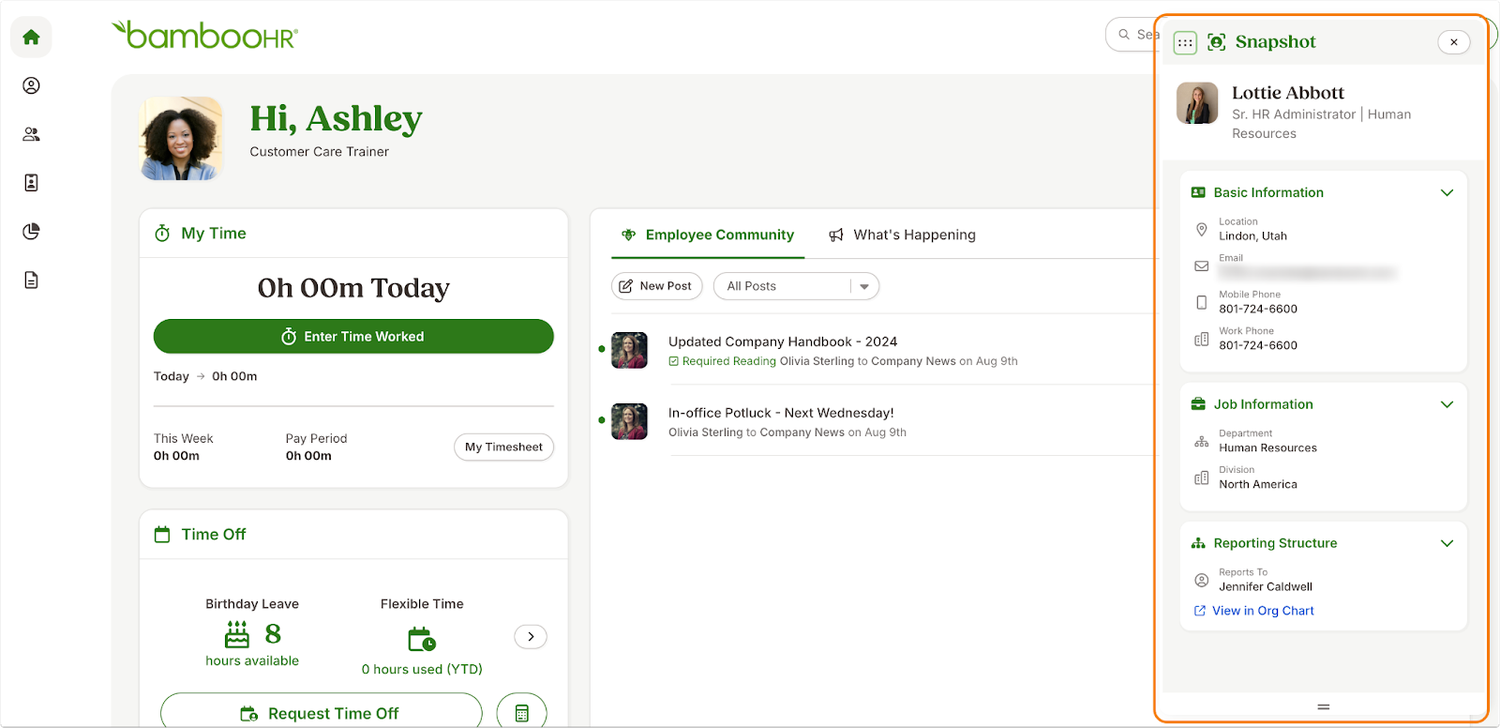
BambooHR introduced shift scheduling within Time & Attendance in 2026. Include it in a current evaluation instead of assuming the product only stores employee records and PTO requests. [7]
What that means for a pawn shop
A shop with frequent hiring or disorganized employee paperwork may value a central system. A very small team should first measure the time spent on those tasks. The flat small-team subscription can be easier to justify when it replaces substantial work, not merely a spreadsheet that already works well.
Questions that can change the decision
1. What is the full monthly amount for HR, payroll and Time & Attendance at our size?
2. Can a manager publish, change and approve schedules from the devices used in our store?
3. Show hiring a staff member, collecting paperwork and transferring approved data into payroll.
4. Which training and implementation services are included?
5. What support is available during our operating hours?
Two details worth verifying
The pricing page shows slightly different larger-team Core and Pro rates in its headline cards and FAQ; use a written quote. It offers monthly or extended terms. [6] The services page lists live support Monday-Friday, 6 a.m.-6 p.m. Mountain Time, alongside 24/7 AI help. Confirm payroll-specific support and holiday coverage. [8]
Source notes: [6] BambooHR pricing. [7] Time & Attendance launch. [8] Services and support. Small-team cost examples appear in the cost comparison.
06 / Platform profile
Paycom
The strongest reason to investigate: employee involvement in checking pay and a connected HR/payroll process.
What it offers
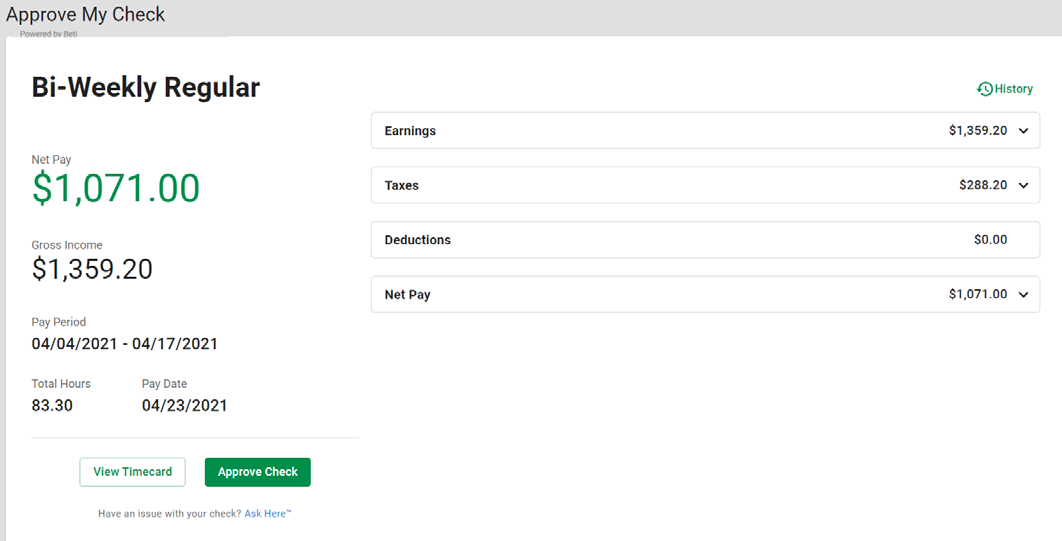
Paycom's Beti workflow lets employees review pay before payroll submission and helps surface issues for correction. This changes who participates in payroll preparation, not just the appearance of the payroll screen. [10]
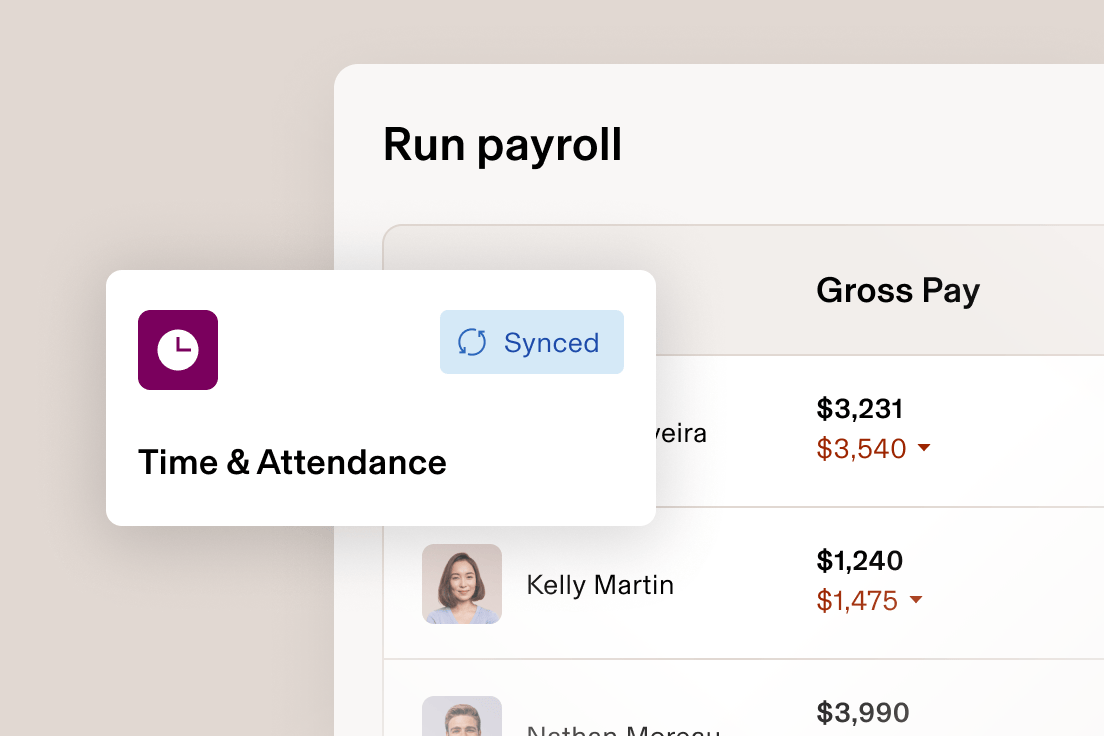
Its retail materials describe shift swapping, employee availability, labor allocation and pay schedules including off-cycle commissions. These are relevant capabilities to demonstrate using a store scenario. [11]
What that means for a pawn shop
A team that regularly uses employee self-service may benefit from seeing problems before payday. The store still needs a clear owner for exceptions. Ask what happens when an employee ignores a notification or disputes an amount close to the cutoff. The useful result is fewer unresolved issues, not simply more reminders.
Questions that can change the decision
1. Demonstrate an employee failing to review their pay: what does the manager do next?
2. Show a commission adjustment and an incorrect time entry before and after submission.
3. How do staff without a personal smartphone complete required tasks?
4. Show the accountant's exact export and any connection to our other systems.
5. What are the complete setup, ongoing, renewal and exit costs?
Pricing and support
Paycom quotes according to workforce size and selected functions. Its pricing page describes a one-time implementation fee and dedicated-specialist support without an additional ongoing support charge. It does not publish a standard dollar price there. A named specialist does not by itself establish weekend coverage; request the service schedule and escalation path. [9]
Source notes: [9] Paycom pricing. [10] Beti. [11] Retail capabilities. Exact integration and employee-review fallback behavior must be demonstrated.
07 / Platform profile
ADP Workforce Now
The strongest reason to investigate: broader payroll and HR administration for larger operators. Small shops should also evaluate RUN.
Choose the ADP product first
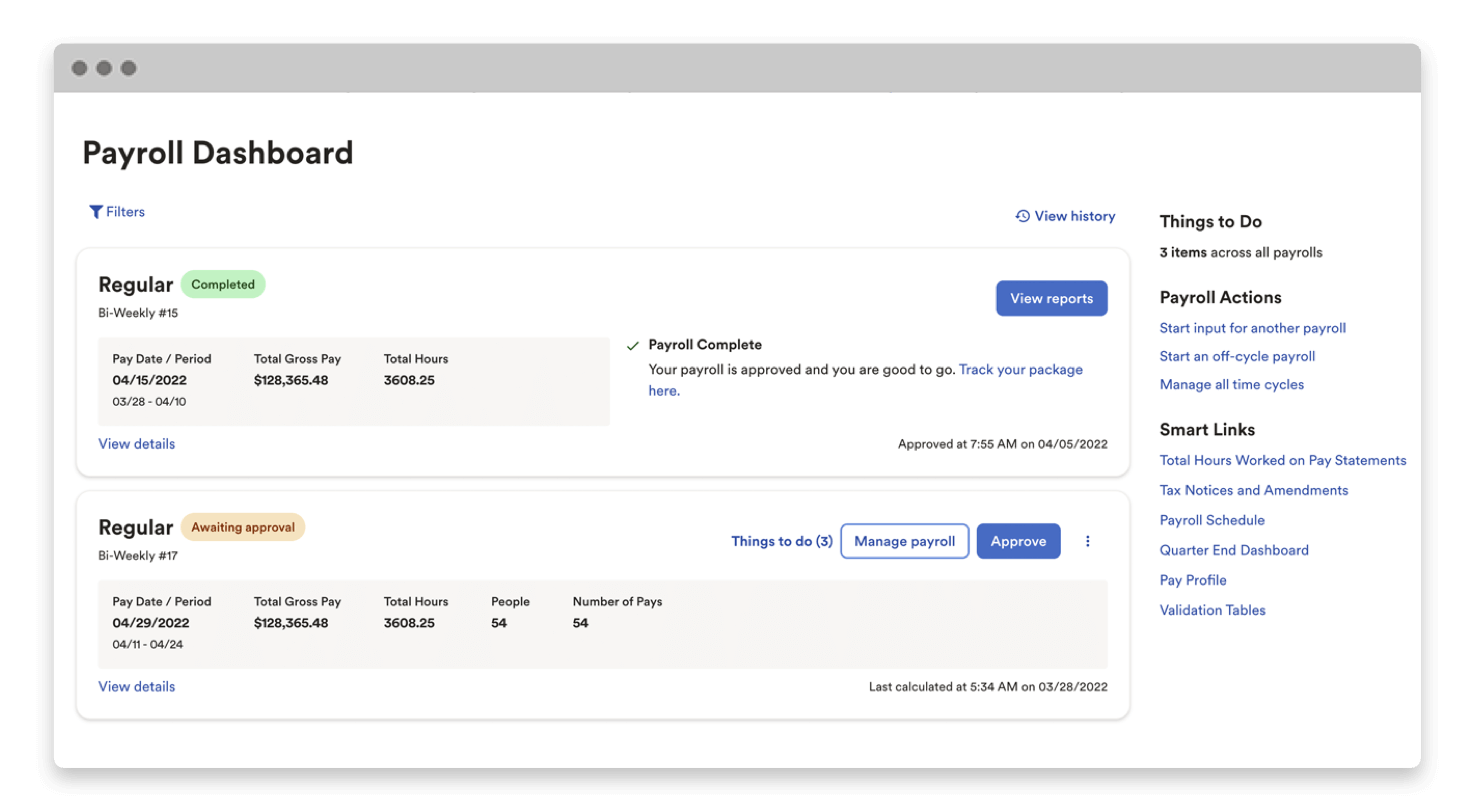
ADP's own comparison positions RUN for businesses with 1-49 employees and Workforce Now for midsize and enterprise businesses with 50 or more. These are vendor positioning guidelines; get advice on your specific configuration rather than treating headcount as a universal eligibility rule. [13]
| WORKFORCE NOW PACKAGE | PUBLISHED DISTINCTION |
|---|---|
| Select | Payroll and HR suite. |
| Plus | Adds benefits administration to Select. |
| Premium | Adds Time & Attendance to Plus. |
Workforce Now pricing requires a quote. Confirm all modules, service fees, implementation and optional services in that proposal. [12]
Questions that can change the decision
1. Why is the proposed ADP product appropriate for our size and operating model?
2. Which package contains the time, scheduling and benefits tasks we need?
3. Demonstrate store-level permissions without exposing other stores' employee information.
4. Identify charges, if any, for payroll runs, year-end forms, extra entities and corrections.
5. If we outgrow the starting product, what changes, costs and migration work would follow?
Do not transfer a support promise between products
ADP advertises 24/7 real-person payroll support for RUN. Verify the specific support arrangement for any Workforce Now proposal rather than assuming that another ADP product's promise applies. [14]
Source notes: [12] Workforce Now packages. [13] RUN vs Workforce Now. [14] RUN product and support information.
08 / Test the work
Give every vendor
the same demo
PSS original evaluation exercise. Use fictional staff and transactions; ask the vendor to demonstrate each step live.
| SCENARIO | WHAT A USEFUL DEMONSTRATION SHOWS |
|---|---|
| 1. Open the store | Assign the opening shift to a suitable employee. Show what happens if that person is unavailable. |
| 2. Change a shift | A staff member swaps a Saturday shift. Show manager approval, schedule notification and the resulting record. |
| 3. Correct time | One employee forgets to clock out. Identify the issue, correct it and show the edit history and approval. |
| 4. Split locations | An employee works at two stores. Show hours, permissions and labor reporting by location. |
| 5. Add variable pay | Add a sample commission. Show the input source, approval and payroll result; explain any manual steps. |
| 6. Fix pay | Discover an error before submission, then discuss one found after submission. Show the process, deadlines and fees. |
| 7. Export and leave | Produce the accountant's required file and an employee-data export. Explain continued access after cancellation. |
Score what you actually observe
0 = not shown or unsupported. 1 = works only through a workaround. 2 = works with acceptable manual steps. 3 = completes the workflow clearly with the controls you require. Record the product tier and add-ons used in each demonstration.
Ask the manager who will use the system to repeat two common tasks. Note elapsed time, help needed and errors. These observations describe that demonstration; they do not prove general product performance.
09 / Take this to the sales call
The comparable-quote
worksheet
Request the same scope from each vendor. Blank cells are questions to resolve, not assumed zero costs.
Our scope: _____ employees _____ locations _____ legal entities
Pay frequency: __________ Work states: ______________________
Required tools: payroll / HR / timekeeping / scheduling / benefits / other
| QUOTE COMPONENT | VENDOR A | VENDOR B | VENDOR C |
|---|---|---|---|
| Product, plan and quote date | ________ | ________ | ________ |
| Base + employee monthly fees | ________ | ________ | ________ |
| Required modules / minimum seats | ________ | ________ | ________ |
| Setup, migration and equipment | ________ | ________ | ________ |
| Run, correction and year-end fees | ________ | ________ | ________ |
| Year-one total / year-two total | ________ | ________ | ________ |
| Term / renewal / cancellation notice | ________ | ________ | ________ |
| Human support hours / escalation | ________ | ________ | ________ |
| Exports / access after cancellation | ________ | ________ | ________ |
Require written answers to these four questions
Scope: What must we buy to reproduce the demo?
Volume: What changes if we add or remove five employees?
Timing: What are submission and funding deadlines, and who handles a missed deadline?
Exit: What money is due if we leave, and how do we retrieve our records?
10 / Move with a plan
A deliberate switch
beats a rushed signup
PSS implementation checklist. Assign an owner to every task and agree the schedule with the provider and your payroll/accounting adviser.
Before committing
Document current pain points and must-have workflows. Obtain a complete quote and service scope. Confirm that the people who will operate the system can use it. Record unresolved questions, contractual notice dates and the budget owner's decision.
Before loading employee information
Agree what records will transfer, who checks them and how they are transmitted. Use the provider's secure process. Map employee identifiers, work locations, pay rates, balances, deductions and opening payroll figures. Keep access limited to the staff who need it.
Before the first live payroll
Reconcile a test calculation against expected results with your payroll specialist. Investigate differences rather than assuming they are acceptable. Confirm funding arrangements, deadlines, employee access and the procedure for urgent corrections. Ask staff to check their information through the approved process.
Before ending the old service
Agree responsibility for outstanding filings, amendments and year-end forms. Export needed records and verify that they can be read. Confirm when access ends and what retrieval service remains available. Record cancellation confirmation and any remaining fees.
This edition contains no affiliate tracking links. It is not sponsored by the featured vendors. Future commercial links should be clearly disclosed, and recommendations should continue to follow the stated evaluation criteria. This guide supports software selection; payroll configuration and employment decisions require the appropriate professional review.
11 / Evidence register
Sources you can check
All sources below were reviewed on October 13, 2026. Links are ordinary source links, not affiliate links.
[1] Deel: pricing and promotional terms
[2] Deel: US payroll, service models and FAQs
[3] Rippling: pricing and modular structure
[4] Rippling: employee scheduling
[6] BambooHR: plans, small-team fees and add-ons
[7] BambooHR: Time & Attendance with shift scheduling
12 / Evidence register
Context, limitations
and your next step
A useful guide shows its evidence and the questions that remain open.
[10] Paycom: Beti payroll workflow
[11] Paycom: retail capabilities
[12] ADP: Workforce Now packages
[13] ADP: RUN and Workforce Now comparison
[14] ADP: RUN payroll and support
[15] Software Advice: public 20-page HR buyer report
How we used the Software Advice report
The public PDF names the same five products as the promotional email and labels its content as 2025. Its methodology selects category standouts using review criteria, rather than a simple descending overall-rating list. We used it to identify comparison topics and verify the shortlist; we did not reproduce its review excerpts or treat its older prices as current. [15]
What is deliberately left unranked
We do not award a universal winner, invent customer ratings, or label a product cheapest without like-for-like quotes. Weekend human support, exact integrations, contractual terms and the complete cost of many configurations remain vendor-confirmation items.
Visit PawnShopSoftware.com for more software and equipment coverage.
13 / PRODUCT SCREEN REFERENCES
See the software.
Focus your next demo.
These vendor-published screenshots and product images show examples of the interfaces. They are not screenshots of PSS testing or a pawn shop’s live account. Select an image to view it at full size.
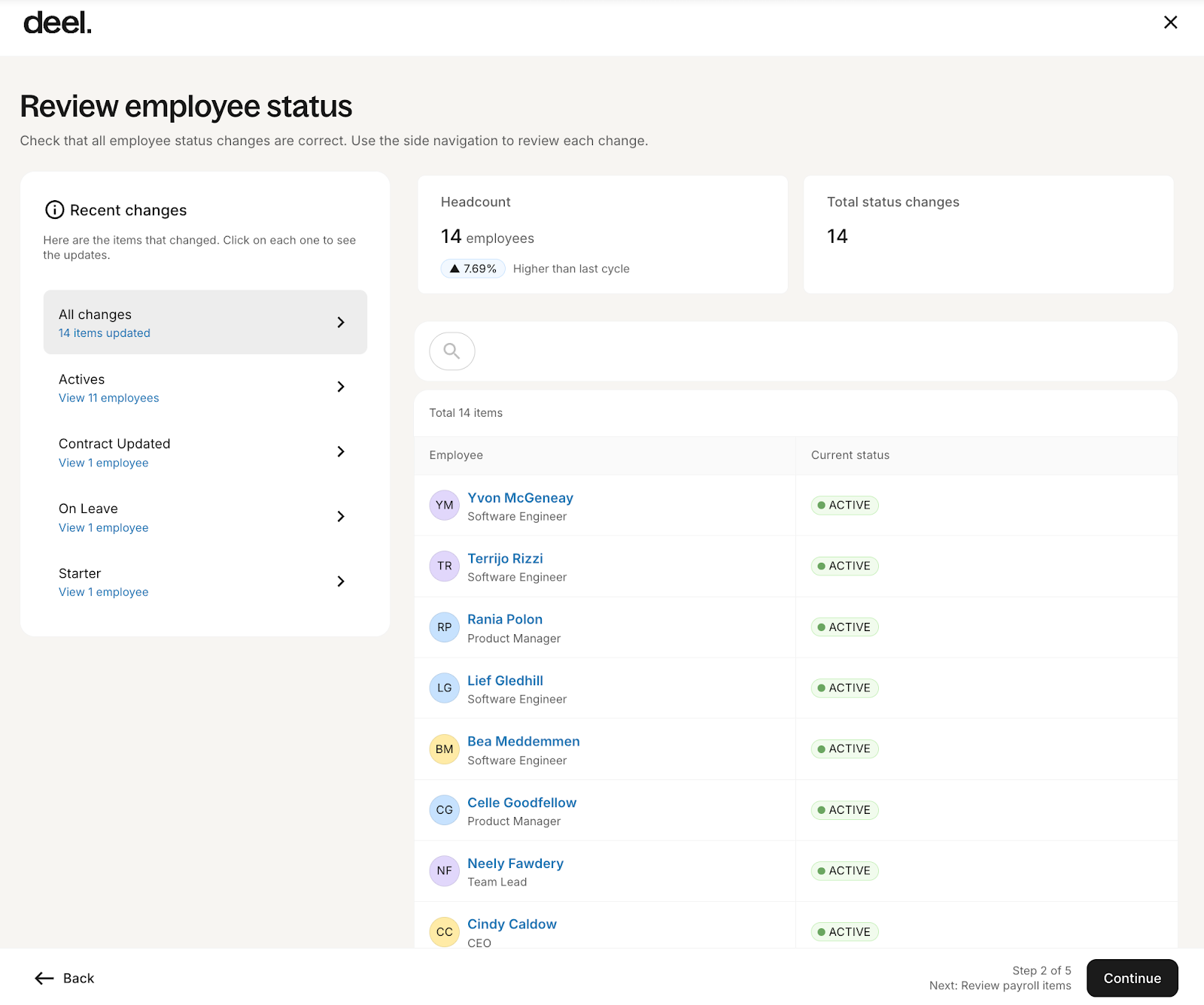
Deel · Payroll cycles dashboard
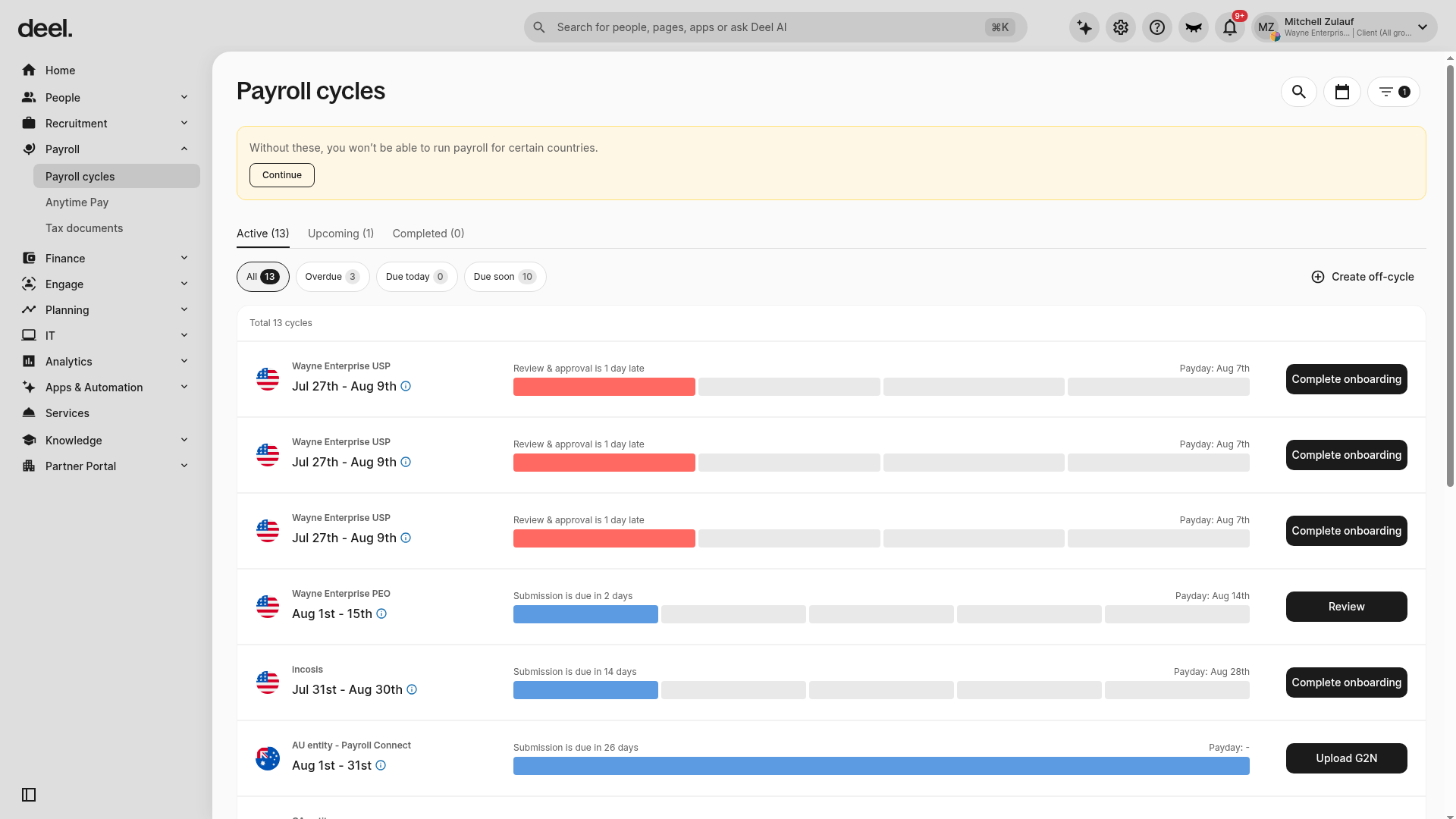
Vendor-published screenshot showing payroll-cycle status, deadlines and entity-level rows. The view illustrates navigation and monitoring; it does not establish the scope of a US payroll subscription.
Ask during your demo: Ask the vendor to open your proposed US payroll configuration, identify the next approval and funding deadlines, and show who resolves an overdue item.
Source: Deel Help Center: About the Deel Payroll Dashboard. Accessed October 13, 2026. Image rights belong to the respective vendor. Interface, plan and regional availability may change.
Rippling · Scheduling interface
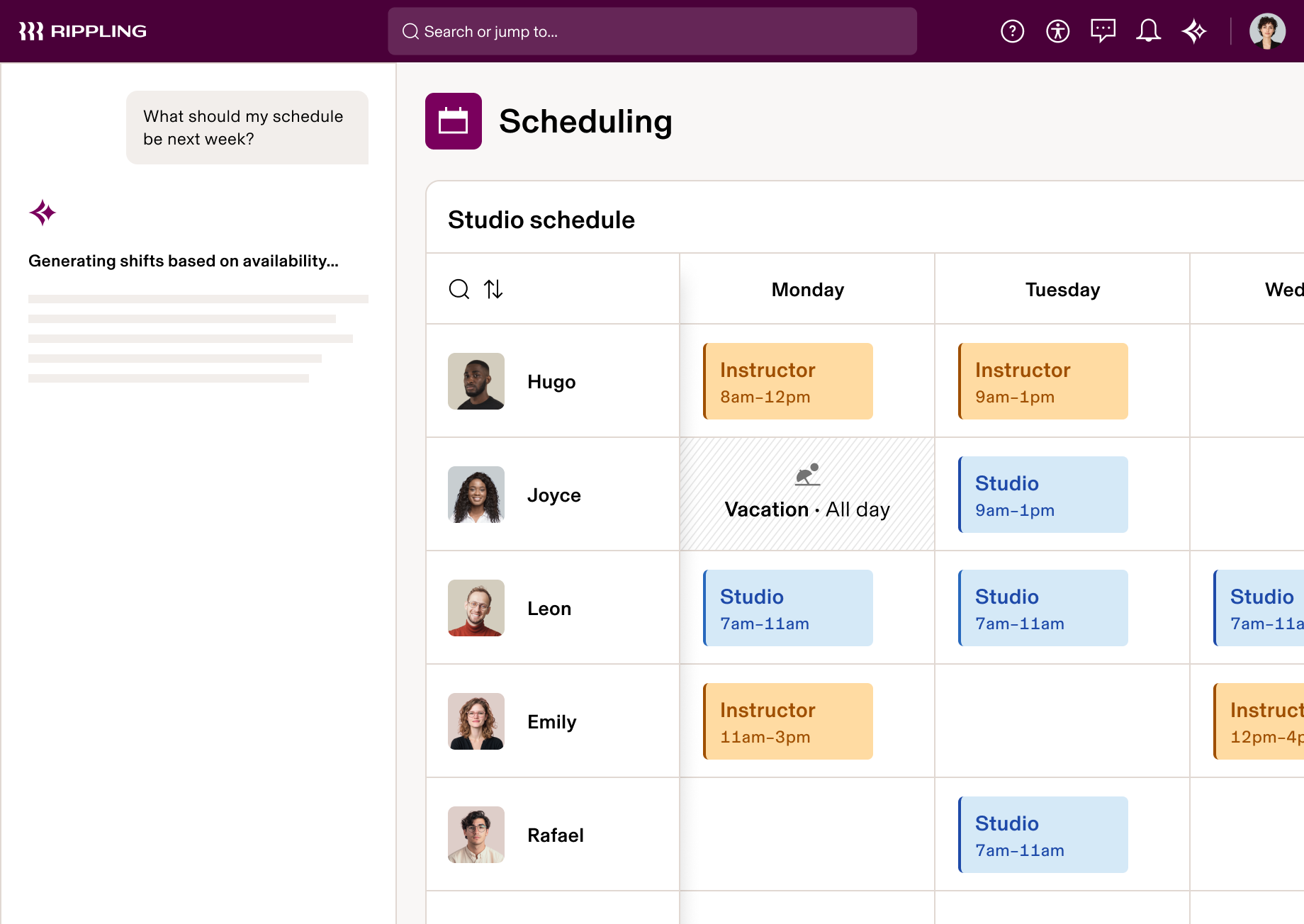
Vendor-published interface image illustrating an AI-assisted draft schedule with shifts and time off. This is a product presentation, not a PSS test of schedule accuracy or legal compliance.
Ask during your demo: Use fictional staff to demonstrate a Saturday shift swap, a manager approval and the resulting timecard. Identify the required products, human review and work-location settings.
Source: Rippling: Employee Scheduling Software. Accessed October 13, 2026. Image rights belong to the respective vendor. Interface, plan and regional availability may change.
Paycom · Payroll dashboard and employee app
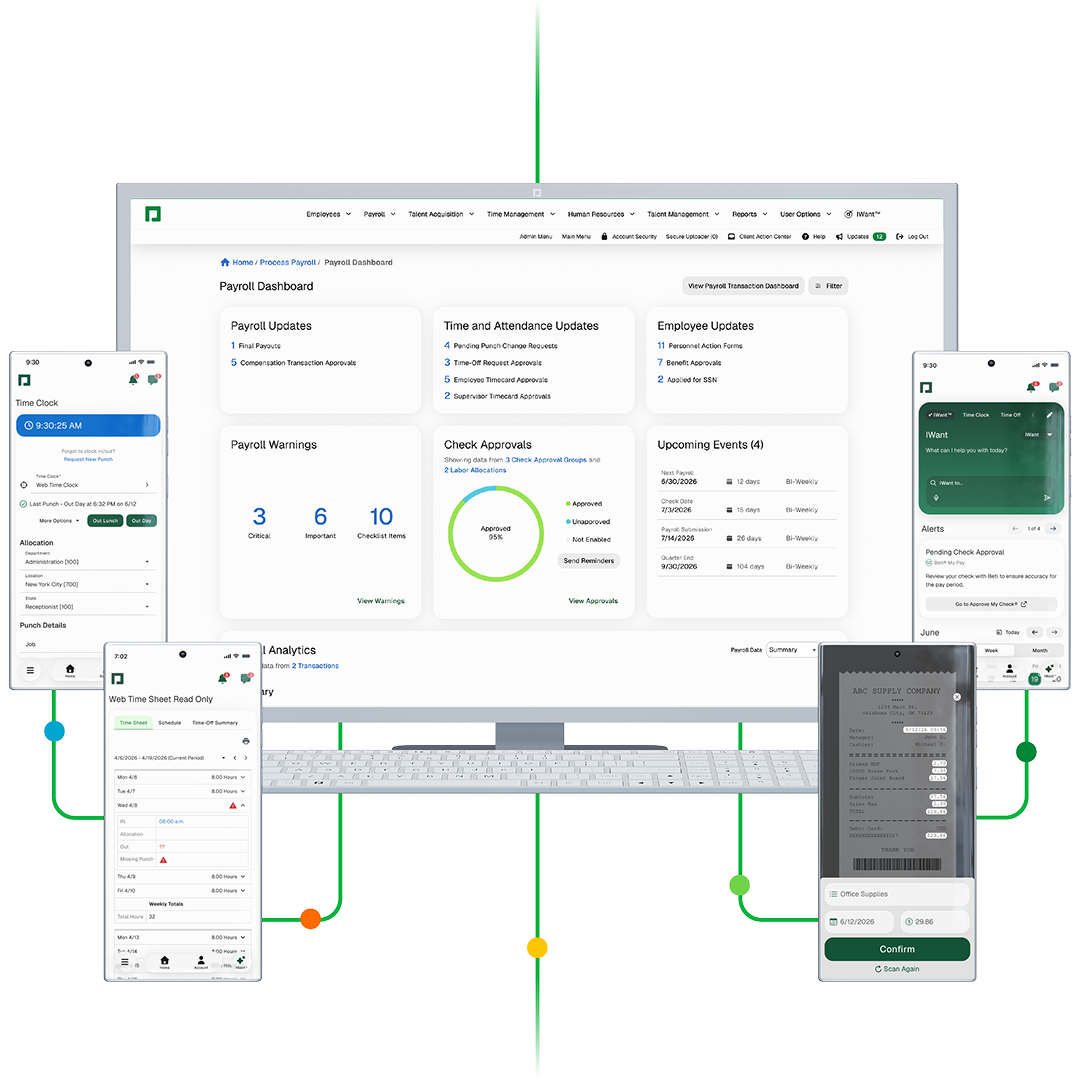
Vendor-published product composite showing the payroll dashboard alongside mobile timekeeping, expenses and paycheck-approval views. Device frames and connecting lines are part of the original vendor artwork.
Ask during your demo: Demonstrate a missed clock-out and an employee who has not approved a paycheck. Show the manager's next action, the deadline and the escalation process.
Source: Paycom: Beti automated payroll software. Accessed October 13, 2026. Image rights belong to the respective vendor. Interface, plan and regional availability may change.
ADP Workforce Now · Desktop and mobile home views
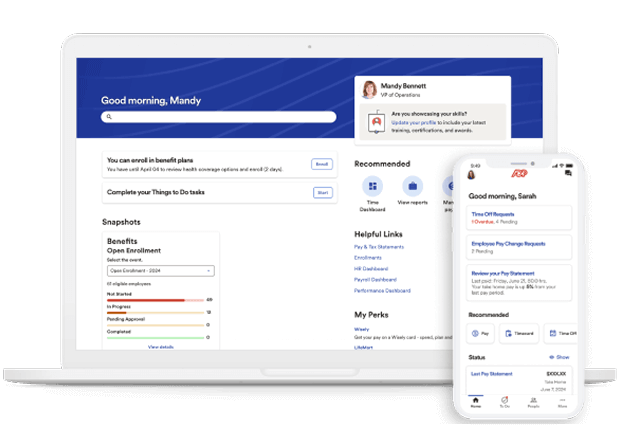
Vendor-published device mockup showing Workforce Now home screens, tasks and pay-related shortcuts. A desktop/mobile presentation does not establish that both users have identical permissions or features.
Ask during your demo: Ask your manager to locate a pay statement, a pending task and a time-off request in the quoted package. Small shops should also ask ADP to explain whether RUN is the more suitable starting product.
Source: ADP: Workforce Now product overview. Accessed October 13, 2026. Image rights belong to the respective vendor. Interface, plan and regional availability may change.
14 / IMPORTANT NOTICES
Scope, responsibility
& disclosures.
Educational purpose. PawnShopSoftware.com, operated by BuzzTransit LLC, provides general software-buying information. This guide is not individualized legal, tax, accounting or employment advice, and using it does not create a professional advisory relationship. Obtain advice from a qualified employment attorney, accountant or payroll professional for your circumstances.
Federal, state and local rules. Requirements vary by work location, employer size, worker classification and other facts, and can change. Relevant topics may include minimum wages, overtime, meal/rest periods, leave, pay frequency, wage statements, final pay, records, taxes, privacy and automated hiring tools. This guide is not a complete legal inventory or a determination of which rules apply to a particular business. Verify current requirements with the relevant agencies and advisers. [16]-[19]
Software setup and compliance. No featured product is certified by PSS as compliant in every jurisdiction. A feature, alert or vendor claim is not a guarantee of lawful results. Ask the provider to confirm the supported locations, exact plan, required settings, update process and work that remains with the employer. Obtain written confirmation and test the relevant workflows before use.
Employer and provider responsibilities. Outsourcing payroll generally does not eliminate the employer's federal employment-tax obligations. Confirm the responsibilities that apply to the specific service arrangement, including any PEO or certified PEO arrangement. Verify tax deposits, deadlines and filings through appropriate independent records; investigate errors promptly. [20]
Research and commercial limits. The comparisons are based on public research, not hands-on testing or negotiated quotes. Prices, functionality, contracts, support and integrations can change; confirm them directly before purchasing. Product-fit judgments are editorial assessments, and no savings, performance or compatibility result is guaranteed.
Affiliate disclosure. This guide contains no affiliate tracking links. If PSS later receives commissions or other benefits connected with recommendations, that relationship should be clearly disclosed alongside the affected content or links. An end-of-guide notice is not a substitute for a prominent disclosure where readers encounter a paid recommendation. [21]
Screenshots and trademarks. The product screen references use vendor-published screenshots and product images for identification and editorial discussion. They are not screenshots of PSS testing or a pawn shop's live account. Names, interfaces, logos and image rights belong to their respective owners. Inclusion does not imply sponsorship, endorsement, a verified integration or availability in a particular subscription.